
What reason do we register for a Google Adsense account?
- The short, simple answer is that you want to earn money.
So what is the easiest way to register a google adsense account?
- In my experience, the easiest and least complicated is via Youtube.
How to process google adsense account registration via youtube?
- What is clear is that you must have an original video to be uploaded to YouTube
Does that mean we have to have an account on Youtube too?
- Yes, yeah, rather than asking questions and I answer them myself. 😀
Please refer to the article the easiest way to register a google adsense account below.
One Gmail Account for All
Just one Gmail account for all, so difficult issues become easy because with only 1 Gmail account, we can register all of them.
That is Google's specialty, so we are not complicated to make emails again until the adsense account creation stage.
Because all of it belongs to Google, it only needs to go through the stages of the registration process. So you have to remember your e-mail and password well if you need to record and save them.
Why must through Youtube?
This method is the easiest to accept compared to registering a google adsense account through blogspot (blog), which has to go through the post review stage. What is clear is we have to prepare an article or blog that is feasible. (not beta)
Alright, let's just prepare the steps for registering an AdSense account via YouTube
Stage 1
Registering Google email, here I will not explain how to create a Gmail account, because I think it is not too difficult to create a Gmail account. For those who already have a gmail account, go directly to stage 2.
Stage 2
Sign in to Youtube, please go to the Youtube page (with your Gmail) upload the video that you have prepared before, try your original video. To simplify the process and don't use background songs that violate the copyrights of others.
Stage 3
Account settings, Verify your YouTube account first, usually using your mobile number. Next do the process according to the picture below.
list of adsense youtube
Image Caption No. 1
1. Click on creator studio, which is in your profile picture
2. Click a channel - status and features
3. In the monetization section, click Activate.
Then follow the instructions according to the picture, no. 2, no. 3, no. 4 and no. 5
list of adsense youtube
list of adsense youtube
adsense youtube
That is Google's specialty, so we are not complicated to make emails again until the adsense account creation stage.
Because all of it belongs to Google, it only needs to go through the stages of the registration process. So you have to remember your e-mail and password well if you need to record and save them.
Why must through Youtube?
This method is the easiest to accept compared to registering a google adsense account through blogspot (blog), which has to go through the post review stage. What is clear is we have to prepare an article or blog that is feasible. (not beta)
Alright, let's just prepare the steps for registering an AdSense account via YouTube
Stage 1
Registering Google email, here I will not explain how to create a Gmail account, because I think it is not too difficult to create a Gmail account. For those who already have a gmail account, go directly to stage 2.
Stage 2
Sign in to Youtube, please go to the Youtube page (with your Gmail) upload the video that you have prepared before, try your original video. To simplify the process and don't use background songs that violate the copyrights of others.
Stage 3
Account settings, Verify your YouTube account first, usually using your mobile number. Next do the process according to the picture below.
list of adsense youtube
Image Caption No. 1
1. Click on creator studio, which is in your profile picture
2. Click a channel - status and features
3. In the monetization section, click Activate.
Then follow the instructions according to the picture, no. 2, no. 3, no. 4 and no. 5
list of adsense youtube
list of adsense youtube
adsense youtube
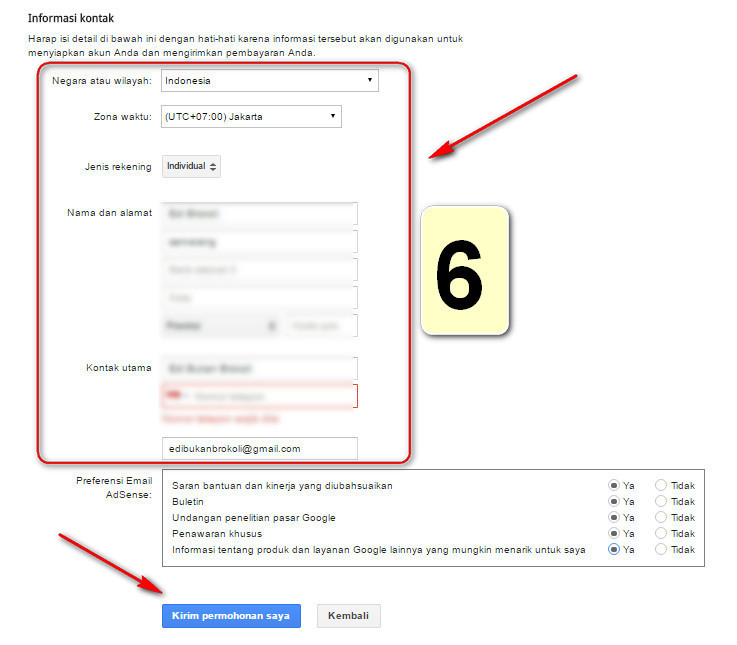
Account type: Individual
Next enter the name of the following payee with full address, in this section it is very important !!, write the address according to your identity. Adjust the address on your KTP (include the house number). When finished, click send my request.
Why do you have to fill in the address according to your KTP? Because the party from Google will send a PIN via postal mail (not email) to your home if your balance is on the threshold, to verify your address. So please pay close attention.
Because in many cases, creating a google adsense account with an unclear address, sending a PIN from Google is delayed or not reaching the destination address, this will hurt you later on.
That's how to create a Google adsense account via Youtube, after the process is complete (figure 5) you will be asked to verify your new google adsense account through your mobile number.
After that just waiting for approval from the google adsense, usually a long time 1-7 days or maybe it could be more, depending on the policies of google adsense.
But the experience that has already been, in less than 3 days has been directly approved (approved). So just be diligent about checking your email.

No comments:
Post a Comment