Friday, August 16, 2019

Easy Ways to Create a New Location on Google Maps


membuat lokasi baru

Google Maps is one of Google's most widely used services. There are several reasons why Google Maps is widely used, including Google Maps can show road maps, traffic conditions, to create new locations.

If you currently have a business, then it is better to create a new location for the business that you manage. By creating a new location, the business that you manage will be easily found by other Google Maps users. If you are interested in creating a new location on Google Maps, you can follow the tutorial below.

Create a New Location with a Smartphone

1. Please open the Google Maps application on your smartphone.

2. Tap the three horizontal lines located in the upper left corner, then select add place.
3. Please fill in the requested data.

4. To enter your business location on Google Maps, please tap the location update on the map. Then, please point the pin to the appropriate position (your business position is). After successfully finding a suitable position, please tap OK.
5. If you want your business to look professional, you can also add telephone numbers, opening hours, to site addresses. However, all of that is only optional, that is, you can add or not.

6. Please check your email, and if it is approved by Google, you will get an email notifying you that the addition of a place is successful.

7. Done.

Make a New Location with a PC or Laptop

1. Please open the Google Maps site on your PC or laptop.

2. Find where your business is located, then right-click on the mouse, and select add place.

3. Fill in the data as you did on the smartphone, and when it's finished, please click send.

4. Just like when you create a new location through a smartphone, you also have to check your email to find out whether or not adding a place was successful.

5. Done.

Everything Has Utilized Google Maps

Although your business is still small at this time, you don't need to be discouraged or reluctant to add its location to Google Maps due to the fact the field shows that small traders, such as coffee shops, to fried rice sellers have also made use of the place add feature on Google Maps.

In essence, you do not need to be embarrassed because the name of the business did start from a small one first. If you do not currently take advantage of the existence of technology, of course you will lose yourself because now everyone has been technology literate or easy terms everyone already knows the name online.

That's the discussion that can be delivered related to the creation of a new location on Google Maps. Hopefully by adding the location of your business on Google Maps, the business that you are running has many buyers and is growing rapidly going forward.

Here's How To Know The Country Of Origin Of Your iPhone


iPhone's home country

How to Know the Country of Origin of Your iPhone - Didn't you think of knowing the country of origin of your iPhone? Or are you really sure that the iPhone that you have now is the iPhone that is for Indonesia?


I'm the opposite ..


At first I thought that all iPhones sold in Indonesia were made in China. Why do I think like that, because when I pay attention to the writing on the back of the iPhone it says "Assembled in China".


Please check it yourself now on the back of our iPhone, is it the same as what I meant?


After I browsed to find the truth of this problem ... Asseeeekkk ... I finally found the answer to my anxiety. Assembled in China "means" Assembled in China "not" Made in China ". If for him, please stay at Cupertino sono ... hehe


Okay, for friends who want to know the country of origin of their iPhone or iPad, you can use the following methods.


Check Through iPhone / iPad Models

To find out the origin of your iPhone / iPad from the model, all you have to do is:


1. Open the Settings menu.


2. Select General


3. Select About.


4. Then scroll down until "Model" appears


Megenai-iphone


You should pay attention to the two letters before the slash, for example your device model is ME040J / A. So, what you have to mark is the letter J, which code J is for the country of Japan.


How about the other code? You can check through the model code list and country of origin below.


IPhone Model and Country Code

A - Canada


AB - Saudi Arabia, UAE, Qatar, Jordan, Egypt


AE - Saudi Arabia, UAE, Qatar


B - UK and Ireland


BG - Bulgaria


BR - Brazil


BT - UK


BZ - Brazil


C - Canada


CH - China


CI - Paraguay


CM - Hungary, Croatia


CR - Croatia


CS - Slovakia, the Czech Republic


CN - Slovakia


CZ - Czech Republic


D, DM - Germany


DN - Austria, Germany, Netherlands


E-Mexico


EE - Estonia


EL - Estonia, Latvia


ER - Ireland


ET - Estonia


F - France


FB - France, Luxembourg


FD - Austria, Liechtenstein, Switzerland


FN - Indonesia


FS - Finland


GB - Greece


GH - Hungary


GP - Portugal


GR - Greece


HB - Israel


HC - Hungary, Bulgaria


HN - India


IP - Italy


J, JP - Japan


IP - Portugal, Italy


ID - Indonesia


K - Sweden


KH - South Korea, China


KN - Denmark and Norway


KS - Finland and Sweden


LA - Guatemala, Honduras, Colombia, Costa Rica, Peru, El Salvador, Ecuador, Nicaragua,


Barbados, Dominican Republic, Panama, Puerto Rico


LE - Argentina


LL - US


LP - Poland


LT - Lithuania


LV - Latvia


LZ - Paraguay, Chile and Uruguay


MG - Hungary


MM - Montenegro, Albania and Macedonia


MY - Malaysia


ND - Netherlands


NF - Belgium, France, Luxembourg, Portugal


PA - Indonesia


PK - Poland, Finland


PL, PM - Poland


PO - Portugal


PP - Philippines


PY - Spain


QB - Russia


QN - Sweden, Denmark, Iceland, Norway


QL - Spain, Italy, Portugal


RO - Romania


RP - Russia


RR - Russia, Moldova


RS, RU - Russia


RM - Russia, Kazakhstan


RK - Kazakhstan


SE - Serbia


SL - Slovakia


SO - South Africa


SU - Ukraine


T - Italy


TA - Taiwan


TH - Thailand


TU - Turkey


TY - Italy


VN - Vietnam


X - Australia, New Zealand


Y - Spain


ZA - Singapore


ZD - Luxembourg, Austria, Belgium, Monaco, Germany, France, Netherlands, Switzerland


ZG - Denmark


ZO - United Kingdom


ZP - Hong Kong and Macau


ZQ - Jamaica


Through the iPhoneFrom Website

iPhone's home country


If you don't memorize the country code list above, you can check it on the iPhoneFrom.com website. You do this by entering the iPhone model in the form provided, then click Check.


Well, after that information will appear about your iPhone / iPad like where your iPhone / iPad is officially sold and you can also find out if your iOS device is included as SU or FU.


SU or Unlocked Software is a device that can only use one cellular operator. So, you won't be able to change your SIM card.


Whereas FU or Factory Unlocked is a device that can use various cellular operators. Suppose you are in a remote area and your SIM card is now difficult to get a signal, you can change the SIM card according to the signal conditions that are there.


Well, to determine SU / FU is quite easy, namely by looking at the padlock icon on the website. If the lock is locked, that means your device is included in the SU. And if the lock is open, congratulations ... Your device is a FU device.

Not a Deception! Here's How to Open Facebook Without the Internet


How to open Facebook without internet? You all must know what Facebook is. Yes, the service made by Mark Zuckerberg is indeed so popular in the world, including Indonesia. Because of its popularity, it's no wonder that almost everyone who knows the internet, must have felt or at least never registered themselves on Facebook.

Unfortunately, to open Facebook requires the internet which means we are required to buy an internet data (quota) package first. In essence, if you want to surf online, then you have to spend money to buy credit which will then be used to buy internet packages.

Although sometimes there are free packages that are deliberately given by the operator, whether it's as a gift or souvenirs of a new sim card, but still the internet package that is not always able to survive.

Departing from that problem, there are so many people who are looking for ways to open Facebook without the internet or to get free internet without getting credit or internet packages.
cara buka facebook tanpa internet
Usually, after searching for it, they will find various tips and tricks for free internet without credit and quota alias internet data package.

Ways - how to open facebook without the internet displayed by search engines are diverse, ranging from easy, medium to complicated. Not only that, there are also other ways that often violate the provisions of the operator, namely the illegal way. However, this illegal method is an improper act and it is better not to be followed.

However, it's not that you can't feel the name of access to Facebook for free. In fact, it turns out there is now a new way that reveals that we can open Facebook for free without Credit and even the Internet and that is certainly legal.

Yes, without INTERNET, you can apparently open Facebook for free. Then how is it done? Indeed, the latest way to open facebook without internet for free this time is very easy to do and proven 100 percent successful.

The method itself is legal which means it does not violate the law and does not harm the operator. Well, here is how to open Facebook for free without credit and the slightest internet.

How to Open Facebook Without the Internet
Before entering the steps to open Facebook for free, you should prepare the following things:

SIM Card (This method is proven successful in Tri).
Smartphone.
Stable and adequate signal.
Free Facebook Steps


  • Make sure the SIM is installed on the smartphone.
  • Also make sure the smartphone is active and is on the stand-by screen.
  • Open the Call feature or application (to call).
  • Type * 325 # then call or dial.
  • If your telephone number has been registered with Facebook, the login screen will appear as that account.
At this point, I think you understand what to do. Furthermore, you can more freely play Facebook without topping up and internet.

Oh yeah, it's a good idea to spread this method to social media so your friends know. That way, all people especially those who live in remote areas where the internet signal is unstable, can take advantage of this way to open facebook without internet to communicate or get information from other people.

How to Know the Video URL Address in the YouTube Application, Already Know?


cara mengetahui alamat url video

In this discussion we will review the tricks in the YouTube application, which are tricks on how users know the URL address of the video in the YouTube application because most YouTube users do not know the trick on this one.

There are many reasons why users do not or do not know this one trick, one of which is the YouTube video URL address in the application is very hidden. In addition, users who are reluctant to explore features in the YouTube application, most likely also will not know.

Do you already know how to find out the video URL address in the YouTube app? If you don't know about it until now, then you don't need to worry because you can listen to the discussion below.

How to Know the Video URL Address in the YouTube Application
1. Please open the YouTube application on your smartphone.

2. Look for the video that you want to know the URL address.

3. If you have found the video, please tap share.

4. There will be a copy link option, please tap on it.

5. To find the video URL address, you can paste it in notepad or other applications.

6. In this tutorial, a copy of the YouTube video link is pasted in the WhatsApp message.

7. Done.

Application Features Are Different from the Site

As we all know that the features in the application are indeed slightly different from those on the site. Sometimes, feature A is already available on the site, whereas the application is not yet or its performance is not as maximum as when we access it on the site.

But sometimes, some features are also provided by the developer or company only in the application, because the reason these features are more suitable to be applied in the application, such as the Stories feature that is owned by the YouTube application that is currently not or not available on its site.

Now, you already know how to see the video URL address in the YouTube application. By knowing the video URL address, when there is a need that concerns YouTube video problems and you are asked for the URL address, then you can provide it quickly because you already know the trick. That's the discussion that can be delivered at this time, and hopefully this discussion is useful.

Trik YouTube, Cara Melihat Foto Profil YouTube Orang Lain

Foto Profil YouTube Bisa Dilihat dengan Jelas dan Juga Disimpan

Hidup di era teknologi seperti sekarang ini harus berhati-hati, karena apabila kita tidak berhati-hati, kita sendiri yang akan merugi. Apalagi zaman sekarang adalah zamannya media sosial, maka usahakan jangan memasang foto pribadi secara berlebihan karena hal yang demikian itu bisa memicu orang lain untuk berbuat jahat atau yang paling minim adalah foto Anda akan disimpan dan disalahgunakan.
Berbicara tentang masalah foto pribadi, khususnya foto profil yang ada di YouTube, para pengguna mengira bahwa foto mereka itu tidak akan bisa disimpan oleh orang lain. Padahal, menyimpan foto profil orang lain di YouTube itu sangat mudah untuk dilakukan.
Jika foto profil YouTube Anda selama ini masih berlebihan atau erat hubungannya dengan privasi, maka sebaiknya Anda segera mengubahnya, karena apabila foto Anda itu disalahgunakan oleh orang lain, maka Anda sendiri yang akan repot.
Pada pembahasan kali ini, kita akan mengulas bagaimana caranya melihat foto profil orang lain. Melihat foto profil orang lain adalah salah satu trik YouTube yang seharusnya sudah diketahui oleh para pengguna. Namun apabila Anda belum mengetahuinya, silakan Anda menyimak pembahasannya di bawah ini.

Cara Melihat Foto Profil YouTube Orang Lain

1. Buka situs YouTube di peramban komputer Anda.
2. Cari foto profil yang ingin dilihat. Di sini, kita mencarinya melalui kolom komentar.
3. Jika sudah menemukan foto profil yang ingin dilihat, silakan klik kanan → buka gambar di tab baru.
4. Foto profil masih berukuran kecil, yaitu 48 piksel.
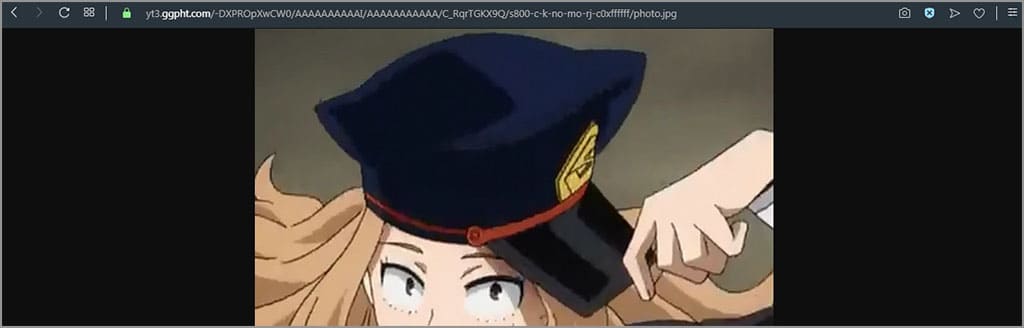
5. Silakan ubah ukuran 48 menjadi ukuran yang lebih besar, misalnya 800.
6. Hasilnya, foto profil tersebut akan membesar dan Anda bisa melihatnya dengan jelas.
7. Selesai.
Ketika dimensi Anda ubah ke 800 piksel, maka ketika Anda mengunduh foto profil YouTube tersebut, Anda akan mendapati ukuran fotonya sebesar 800 piksel. Ketika Anda memilih untuk mengubahnya ke dimensi yang lebih kecil, seperti 100 piksel, maka dimensi foto yang akan Anda unduh pun juga 100 piksel.
Dengan adanya pembahasan melihat foto profil di YouTube, tentu Anda sekarang sudah tahu jika semua foto yang Anda bagikan ke publik itu bisa disimpan dengan mudah. Bukan hanya foto profil saja yang bisa disimpan, bahkan thumbnail video YouTube pun juga bisa disimpan. Jadi, bijaklah dalam memasang foto profil untuk akun Anda.